Controlling ProB Preferences
ProB provides a variety of preferences to control its behaviour. A list of the most important preferences can be found in the manual page for probcli. We also have a separate manual page about setting the sizes of deferred sets.
Setting Preferences in a B machine
This only works for classical B models. For a preference P you can add the following definition to the DEFINITIONS section of the main machine:
SET_PREF_P == VAL
This will set the preference P to the value VAL for this model only.
For a deferred set AA you can the following definition to the DEFINITIONS section of the main machine to set its size to Nr:
scope_AA == Nr
Alternatively, you can add the following to set the size of AA and to influence the way ProB numbers the deferred set elements:
scope_AA == Min..Max
You can also control the MAX_OPERATIONS preference per operation by adding a declaration in the DEFINITIONS section of your B machine. E.g., to set the preference for myop to 101 you write:
MAX_OPERATIONS_myop == 101
Setting Preferences from the command-line
You can set a preference P to a value VAL for a particular run of probcli by adding the command-line switch -p P VAL, e.g.,
probcli -p P VAL mymachine.mch -mc 9999
You can obtain a list of preferences by calling probcli as follows:
probcli -help -v
You can set a group G of preference to a new setting with a single command:
-pref_group G S
Useful combinations are
-pref_group model_check unlimited
-pref_group model_check disable_max
-pref_group time_out disable_time_out
-pref_group integer int8
-pref_group integer int32
-pref_group integer int64
-pref_group dot_colors classic
-pref_group dot_colors winter
-pref_group dot_colors dreams
-pref_group dot_colors solarize
You can use a preference file generated by ProB Tcl/Tk:
-prefs FILE
This will import all preferences from this file, as set by ProB Tcl/Tk.
You can also set the scope for a particular deferred set GS using the following command-line switch:
-card GS Val
Setting Preferences from ProB Tcl/Tk
ProB Tcl/Tk stores your preferences settings in a file ProB_Preferences.pl.
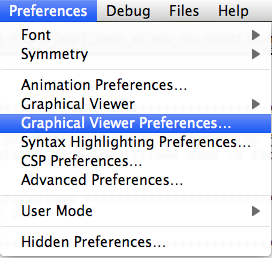
The ProB preferences are grouped into various categories. In the "Preferences" Menu you can modify the preferences for each category:

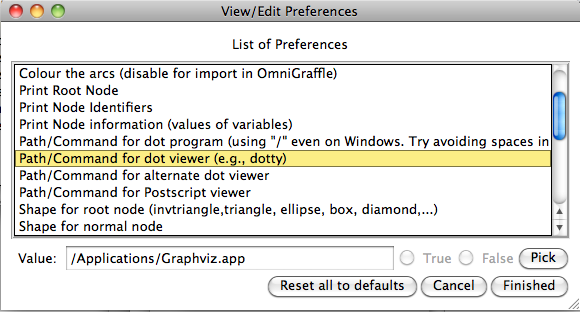
For example, if you choose the graphical viewer preferences you will get this dialog: